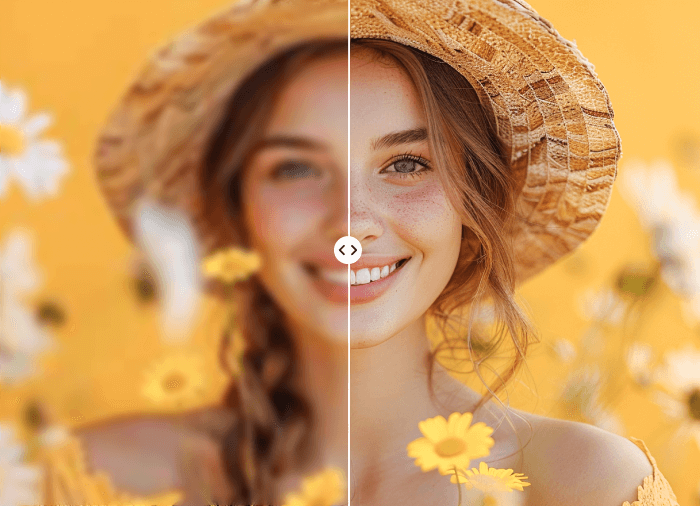

In a world where visuals grab attention faster than text, having high-quality images is critical for social media and website success. Photos that are blurry, low-resolution, or poorly lit can harm engagement — while sharper, clearer images perform better in feeds, ads, portfolios, and blogs.
This is where image enhancer tools come in. These tools use artificial intelligence to automatically improve photo quality by increasing resolution, reducing blur, fixing lighting issues, and restoring details that might otherwise be lost. Whether you’re a blogger, business owner, or content creator, enhancing your images can make your visual content look professional without spending hours in complicated editors.
In this guide, we’ll explore the top five image enhancer tools that you can use to boost your imagery for social media and websites. Let’s dive in!
1. Invideo — AI-Powered Image Enhancer for Creators
Invideo offers a robust image enhancer that improves photo quality by fine-tuning lighting, sharpness, color balance, and resolution. The tool is designed to help creators instantly upgrade visuals that may be blurry, under-exposed, or low-resolution, making them ideal for social media posts, ads, thumbnails, and banners.
Using invideo’s enhancement feature, you can:
- Improve clarity and sharp edges for crisper visuals.
- Correct lighting and exposure to make images look more natural in any setting.
- Reduce noise and enhance detail without compromising the original photo’s quality.
- Boost colors slightly to make images pop while avoiding oversaturation.
- Increase resolution up to 4K, allowing even small, low-res pictures to look sharp on larger screens and modern displays.
Because invideo is also a capable ai video creator app, many content creators use it to power entire workflows that include both video and image editing. This makes it especially useful for social media managers who want a unified tool to refine both visuals and motion content.
Whether you’re preparing images for a post, a story, or a web banner, invideo’s enhancement capabilities are easy to use, fast, and flexible — giving your media a professional edge with minimal effort.
2. Media.io AI Photo Enhancer — Simple and Effective Online Tool
Media.io AI Photo Enhancer is a user-friendly online tool that improves image quality quickly and efficiently. With a clean interface and automatic AI processing, this enhancer is perfect for users who want reliable results without complex settings.
Key features include:
- Automatic resolution upscaling so low-resolution images look clearer and more detailed.
- Unblur and reduce noise to restore sharpness in pictures that were taken in motion or low light.
- Brightness and contrast adjustments to make photos visually balanced and ready for social feeds.
- Restoration of old photos, making this a great option for revitalizing scanned memories.
- Multiple format support including JPG, PNG, and WebP, so users can enhance images regardless of source.
Media.io’s straightforward workflow makes it ideal for beginners, blog owners, and anyone who needs quick enhancements without deep technical knowledge.
3. YouCam Perfect — Portable AI Enhancer for Mobile Editing
YouCam Perfect is a widely used photo enhancement app available on mobile platforms. While not purely AI-only in every aspect, it incorporates smart algorithms that improve image quality and assist with photo refinement directly on your phone.
Highlights of YouCam Perfect:
- Enhances selfies and portraits by sharpening features and correcting lighting.
- Offers beauty-oriented photo tuning that still retains natural looks.
- Works well for content creators who edit on the go without needing a desktop.
- Includes retouch tools, filters, and basic enhancements that help photos stand out on Instagram, TikTok, or Pinterest.
Because mobile usage is central to social content creation, YouCam Perfect is a practical enhancer for users who want to edit and share photos directly from their smartphone.
4. Aiarty Image Enhancer — Advanced Detail and Upscaling
Aiarty Image Enhancer focuses on enhancing the smallest details in photos, making it valuable for creators who want quality improvements beyond basic sharpening. With AI-guided upscaling and denoising, Aiarty helps bring out textures and clarity, especially in challenging images.
Notable capabilities include:
- Denoising and deblurring for clearer images even in noise-ridden photos.
- High-resolution upscaling, making images suitable for larger prints or high-resolution screens.
- Detail reconstruction, especially on textures such as fabric and architecture.
- Versatile use cases from photo restoration to social media enhancement.
Aiarty is especially useful for creators who work with highly detailed visuals, product photos, or images where clarity is critical.
5. Pics Enhancer — Quick AI Image Boost for Everyday Use
Pics Enhancer is a simple yet effective AI tool that enhances photo quality quickly, without requiring technical adjustments from the user. Its focus is on boosting resolution, reducing blur, and balancing color and contrast for better visual appeal.
What makes Pics Enhancer notable:
- Automatic enhancement for images with visibility issues.
- Noise and blur reduction to make pictures appear sharper and more vivid.
- Upscaling up to high definition, suitable for social posts and website graphics.
- Helpful for restoring old and damaged photos that need a modern look.
Pics Enhancer is a fast option for users who want noticeable improvements without fuss and who share visuals often on social platforms.
Why Use Image Enhancer Tools for Social Media and Websites?
Enhancing images isn’t just about making them look prettier — it’s about making them more effective:
1. Boost Engagement
Sharper, cleaner visuals catch the eye faster in social feeds, increasing the chances of likes, shares, and comments. High-quality images also convey professionalism, building trust with your audience.
2. Improve Website Performance
Images optimized for clarity and resolution support better user experience. A well-enhanced hero photo or product image can reduce bounce rates and encourage clicks or conversions.
3. Save Time and Effort
AI-powered enhancers automatically handle complex adjustments that would otherwise require hours of manual editing in traditional software. The result is faster turnaround and more time for content strategy.
Tips for Getting the Best Results
To make the most of image enhancer tools:
- Start with decent source images – better input often leads to better outputs.
- Avoid over-enhancing – too much sharpness or saturation can make images look unnatural.
- Use enhancers before posting – apply improvements before uploading to social posts or web pages for consistent quality.
- Check multiple outputs – if the tool lets you choose enhancement levels, compare results to pick the best version.
Conclusion
High-quality images are a cornerstone of effective digital content. From social media posts to website banners, crisp visuals help your audience connect with your message and boost engagement. With AI-powered image enhancer tools like Invideo, Media.io, YouCam Perfect, Aiarty, and Pics Enhancer, you can transform ordinary photos into striking visuals without complex editing skills.
Start enhancing your images today and watch how better visuals can elevate both your brand presence and audience engagement.